The Smart Garage Ecosystem 2026: How to Build One That Survives Vendor Changes and Closes Safely
Affiliate Disclosure: Pro Garage Gear participates in the Amazon Services LLC Associates Program. We earn from qualifying purchases at no extra cost to you. No manufacturer has paid for placement in this guide.
Facts last checked: October 17, 2026. This area changes quickly; the table below says how sure we are of each claim.
Smart Garage Ecosystem – You Are Not Buying a Gadget, You Are Buying a Dependency: A smart garage door controller looks like a device. In practice it is a relationship with someone’s servers, a radio protocol, and a company policy, and any of the three can change after you’ve paid. In November 2023, Chamberlain, the maker of myQ, shut off third-party access to its cloud, and integrations built on it stopped working. In December 2025, The Verge reported it had done it again: its newer Security+ 3.0 openers block aftermarket controllers. Over the same stretch, the industry standard meant to prevent this kind of lock-in, Matter, added garage doors to the specification.
Most “best smart garage opener” pages answer the question of which product to buy. This one answers the question that comes first: what should your setup be built on, so it keeps working? Product rankings live in our smart garage controller guide and smart opener guide. This page helps you decide which of those two to read, and what to check before you buy.
What’s Verified, What’s Reported, What’s Still Unsettled
Buying guides on this topic contradict each other. Some say Matter has no garage-door category at all; one claims native Matter support on every major platform in 2026. Here is what holds up.
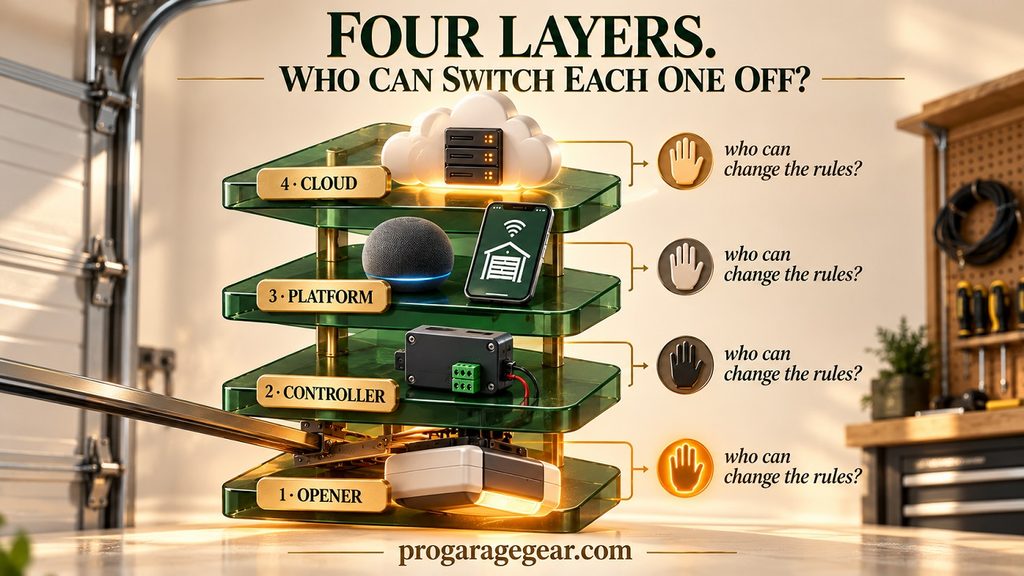
The Control Stack: Four Layers, and Who Can Switch Each One Off
A smart garage has four layers. The useful question for each is the same: who can change the rules without asking you? The fewer layers a single company controls, the less any one decision can break your setup.
Step 0: Check the Network Before You Buy Anything
The most common smart-garage failure isn’t a vendor decision. It’s a controller that sits at the edge of your WiFi and keeps dropping offline. Check the network first; it takes about two minutes.
- Measure where the controller will actually sit. That is next to the opener motor, usually on the ceiling in the middle of the garage. Use a free WiFi analyzer app on your phone, or your router’s mobile app, and read the signal strength at that spot. Aim for -65 dBm or stronger, the same threshold we use in the camera guide. If it’s weaker, fix the network first, with a mesh node, an access point, or a wired Ethernet link, before you buy a controller.
- Check the band. Many garage controllers join only 2.4 GHz WiFi, and Matter-over-WiFi models commonly list 2.4 GHz only. If your router has that band turned off, or merges bands in a way that confuses setup, pairing will fail. Read the listing.
- Detached garages are the hard case. Distance and walls do the damage. A mesh node or an outdoor-rated access point near the garage, or a wired link, is usually the real fix.
- Steel doors matter for what’s outside them. Insulated steel doors can weaken the signal for a camera mounted outside, or when your router sits on the driveway side. They matter less for a controller on the ceiling inside the garage. The camera guide covers the field test.
🛒 Check Price on Amazon — Mesh WiFi Add-On Node →
🛒 Check Price on Amazon — Outdoor WiFi Access Point →
A controller that goes offline is more than an annoyance: it can leave you looking at a “closed” status that is hours out of date.
Step 1: Find Out Which Opener You Actually Have
Everything else depends on this. Look at the label on the motor unit for the brand and model number, then search the model plus “compatibility” on the manufacturer’s site. If you can’t find it, treat the opener as unknown and favor a controller that connects to the wall-button terminals, which depends least on the brand.
Step 2: Choose Your Platform, and Know What You’ll Actually See
Matter is designed so one controller can be shared across Apple Home, Google Home, Alexa and SmartThings at the same time, so you aren’t locked into a single app. Two practical points matter more than the logos:
- Remote access needs a hub that stays online. Away from home, the Apple, Google and Amazon platforms reach a Matter device through a hub in your house, such as an Apple TV, HomePod mini, Echo or SmartThings hub. If the hub is offline, remote control stops, even though the controller itself is fine.
- It probably won’t look like a garage door. Most Matter garage controllers on sale appear in your app as a switch plus a contact sensor, because they were built before garage doors had their own category. Voice assistants may ask you to confirm before opening. Matter 1.5’s closures category is the fix, but both the products and the platforms are still catching up.
Home Assistant sits apart. It controls devices locally and can combine a relay and a sensor into a proper garage door entity, which is why it’s popular with people who’ve been burned by cloud changes. Its official myQ integration was removed in late 2023 after Chamberlain blocked unauthorized access.
Step 3: Decide What Should Happen When Something Fails
Almost no buying guide covers this, and it’s where setups differ most. Compare three designs: a cloud-only controller (works through the vendor’s servers), a local-capable one (also talks to your hub over your home network), and a non-smart opener with a keypad or remote.
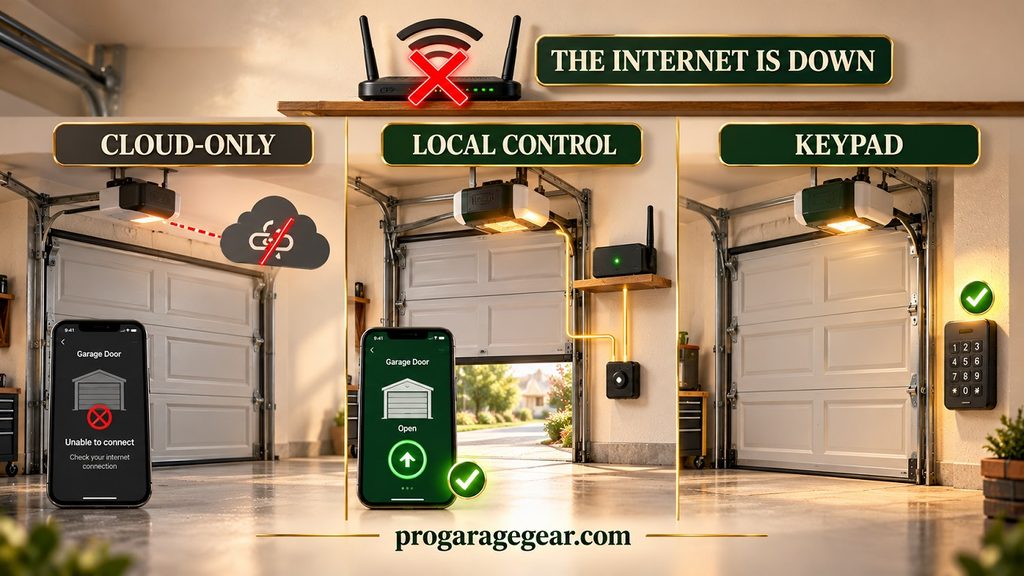
The practical rule: keep one non-smart way in, a keypad or a physical remote, and know where your emergency release cord is. If you’re fitting a camera too, see the release-cord guidance in our garage security camera guide, which explains why you shouldn’t shorten it.
“Closed” Is Not the Same as Secured
Your app tells you the door is down. It doesn’t tell you it’s secure. On some doors, the emergency release cord can be reached through the gap at the top of the door, a weakness that remote closing does nothing to fix. Don’t shorten the cord or disable the manual release; it exists so the door can be opened by hand in a power cut or an emergency. Our camera guide explains a fix that blocks the attack without reducing your reach.
The same logic applies to anything that locks the release in place: it also stops you from using it in an emergency, so think through that case before you add one.
Step 4: Automations Worth Building, and Ones to Skip
Cold Garages Break Sensors Before They Break Batteries
Door-state sensors are the backbone of the best automations (open alerts, camera triggers), and an unheated garage is hard on them. The surprise is that the battery usually isn’t the problem. A CR2032 lithium coin cell is rated for operation down to -30 °C (-22 °F) on the manufacturers’ datasheets, although a battery maker’s guidance notes that usable capacity and pulse current fall sharply below about -20 °C (-4 °F).
The weak link is more often the sensor’s own rated range. For example, Aqara’s popular door and window sensor is rated for 14 °F to 113 °F and for indoor use only. A garage that drops below that on a winter night is outside the manufacturer’s specification. We haven’t found documentation of exactly how such sensors misbehave in the cold, so don’t guess: check the rating.
- Compare the sensor’s rated operating temperature with your coldest night. It’s on the spec sheet, not usually on the box.
- In freezing climates, consider a hardwired magnetic contact switch run to the controller, or a sensor with a lower stated rating, rather than a battery sensor rated only to the freezing point.
- Don’t trust a single alert from a cold sensor. If a “door open” alert arrives at 3 a.m. in a freeze, confirm it with a camera or a second sensor before acting.
- Keep spare cells and replace them in autumn, before the cold, not after the sensor goes quiet.
🛒 Check Price on Amazon — Wired Magnetic Door Contact Switch →
The same physics is why a camera’s “300 days per charge” claim doesn’t survive an unheated garage; see the cold-weather battery section in the camera guide and the freeze-point table in our winterizing guide.
The Unattended-Close Rules Almost Nobody Mentions
Closing a garage door when nobody is watching is the one smart-garage feature governed by safety law. Federal rules have required every residential opener sold in the U.S. since January 1993 to include entrapment protection, and the UL 325 standard, which the CPSC rule (16 CFR Part 1211) reinforces, adds specific requirements for unattended operation, meaning a close triggered by a phone, a schedule or a voice command. According to industry and manufacturer sources:
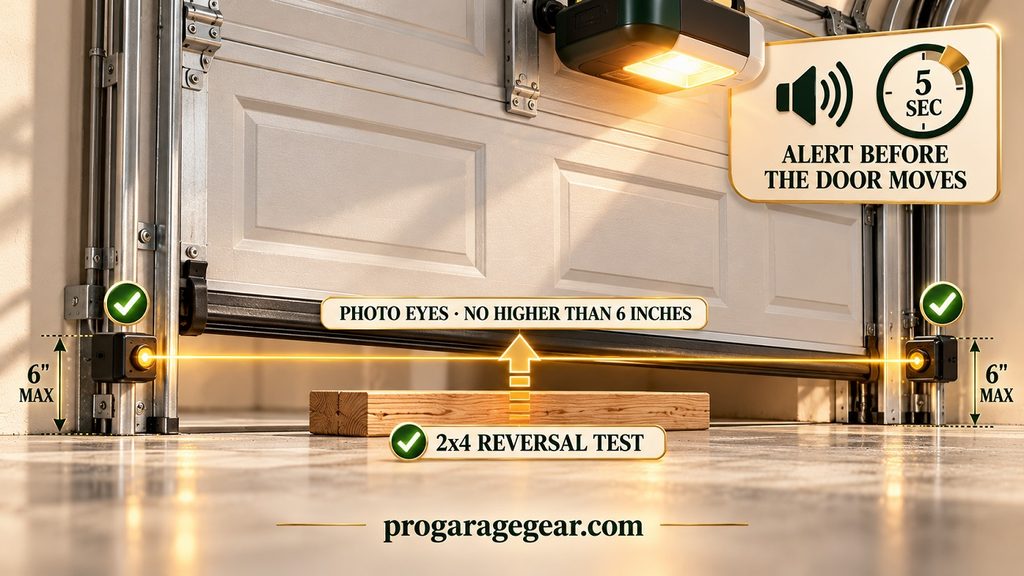
- A warning first. Before the door closes unattended, an audible alert in the garage must sound for at least five seconds, and a visual alert must flash for at least five seconds.
- Lockout after repeated failures. If the door doesn’t close after two attempts because of an obstruction or a safety device, the system must refuse further unattended close attempts.
- Door type. Unattended operation is permitted only for vertically moving sectional doors and horizontally sliding doors.
- No photo eyes, no remote closing. These devices shouldn’t be installed on older openers that lack photo-eye entrapment protection.
The retrofit catch. A controller that simply “presses the button” on your behalf may not add that warning; the opener decides what happens when the button is pressed. We could not confirm that button-press retrofit controllers meet the unattended-operation alert requirement, so don’t assume. Look for the product to say it does, then test it yourself: close the door from the app and see whether it beeps and flashes before it moves. If it doesn’t, don’t close the door remotely when you can’t see it.
The Monthly Check (Two Minutes)
- Photo eyes: they should be mounted no higher than 6 inches off the floor. Block one with an object more than 6 inches tall and press close. The door should not close.
- Reversal: lay a 2×4 flat (about 1½ inches) in the door’s path and close it. The door must reverse on contact. (This is the LiftMaster safety check; Chamberlain’s instructions use the same test.)
- After you change the door seal: repeat both. See our pest control guide for why a different seal can matter.
🛒 Check Price on Amazon — Garage Door Safety Sensors (Photo Eyes) →
Buy sensors that match your opener’s brand and model, and check the listing for compatibility before you order; not every set fits every opener.
Four Build Paths
These are architectures, not rankings. For specific products and prices, use the controller guide or the opener guide. Always read the listing for your exact opener model before you buy.
Path A: Keep your opener and add a wired relay controller
Best for: older Chamberlain-family openers, and nearly any opener with wall-button terminals. A relay at those terminals depends least on the manufacturer’s cooperation. Controllers in this category that advertise Apple Home, Alexa, Google Home and SmartThings support with no subscription include the Meross smart garage door opener, according to 2026 buying guides; check the listing for your platforms.
🛒 Check Price on Amazon — Meross Smart Garage Door Opener →
Path B: A newer Chamberlain-family opener
Best for: people who already own one. Your realistic options are Chamberlain’s myQ system, whose integrations are limited and, per The Verge, increasingly tied to paid subscriptions, or hardware that presses the wall button or your remote, which owners report still works. Matter-certified retrofit controllers that work with your existing remote, such as THIRDREALITY’s, are the kind to look at; ask the seller whether it works with your exact opener and keep the return window open.
🛒 Check Price on Amazon — THIRDREALITY Matter Garage Opener Controller →
Path C: Buying a new opener anyway
Best for: a replacement or a new build. Before you pick, ask three questions: does it have standard wall-button terminals? Does the maker publicly support an open standard such as Matter? And what does its app require a subscription for? Our opener buying guide and smart opener rankings cover specific models.
Path D: Monitoring only
Best for: anyone whose real goal is “did I leave it open?” A tilt or contact sensor plus a camera tells you the state of the door from anywhere, and removes the remote-closing risk entirely. It also works on an opener that has no photo eyes.
🛒 Check Price on Amazon — Smart Garage Door Tilt Sensor →
The Smart Garage Path Finder
Answer five questions and get an architecture to start from, with the checks that matter for your situation. It does not name a product; the guides above do that.
🏠 Smart Garage Path Finder
Pick the architecture first. Products come second.
🏠 Smart Garage Path Finder
Frequently Asked Questions
Does myQ work with Apple Home, Google Home and Alexa?
Not in the way it used to. Chamberlain shut off unauthorized third-party access in 2023, and The Verge reported in December 2025 that the myQ platform keeps narrowing toward its own app and a short list of mostly paid integrations. Several 2026 guides report myQ doesn’t appear natively in the Google Home app and has no official Apple Home support. Check Chamberlain’s current integration page before you rely on any specific connection.
Does Matter work with garage doors?
Yes in the standard, partly in practice. Matter 1.5, released in November 2025, defines a unified “closures” category that includes garage doors. Most controllers on sale still appear in your app as a switch plus a sensor, because they were built earlier, and platform support for the new category is still arriving. A Matter-certified controller is still a good choice, since one device can be shared across Apple Home, Google Home, Alexa and SmartThings.
Can I use a smart controller on a Chamberlain Security+ 3.0 opener?
The Verge reported in December 2025 that Security+ 3.0 blocks aftermarket controllers such as Tailwind. Owners report that hardware which presses the wall button or the remote still works. We haven’t confirmed that, so ask the seller whether it works with your exact opener, and keep the return window open.
Is it legal and safe to close my garage door from my phone?
Yes, if the system meets the unattended-operation rules in UL 325 and the CPSC rule: working photo-eye protection, plus an audible and visual alert for at least five seconds before the door closes, and a lockout after repeated failed attempts. Don’t add remote closing to an opener that has no photo eyes. See “The Unattended-Close Rules” above, and test your system monthly.
Do I need a subscription?
Not for most third-party controllers, several of which advertise none. Chamberlain’s myQ is free for basic app control, but per The Verge its integrations are increasingly tied to paid subscriptions. Check what a product charges for before you buy, since subscription terms change.
What happens to my smart garage when the internet or the power goes out?
It depends on the design. A cloud-only controller usually stops responding when the internet does; a controller that also talks to your hub over your home network usually keeps working locally; and in a power cut everything electric stops unless your opener has a battery backup. Keep a keypad or remote and know where your emergency release cord is.
Why does my smart garage controller keep going offline?
Most often it’s the WiFi signal at the opener, or a mismatch with the 2.4 GHz band many controllers use. Measure signal strength where the controller sits, aim for -65 dBm or stronger, and add a mesh node, access point or wired link if it’s weaker. Detached garages are the usual culprit.
Will a smart garage door sensor work in a freezing garage?
The coin cell inside usually will, since CR2032 cells are rated to -22 °F, but the sensor around it may not. Many consumer sensors are rated only to about 14 °F and for indoor use. Check the rated range against your coldest night, and in a freezing climate consider a hardwired contact switch or a sensor with a lower stated rating.
The Bottom Line
Choose a smart garage the way you’d choose any system that has to keep working for ten years: by who can change the rules, not by which logo is on the box. Identify your opener, decide what should happen when the internet or the vendor fails, keep one non-smart way in, and treat remote closing as a safety feature that has to be tested, not a convenience that can be assumed.
Sources
- Connectivity Standards Alliance: Matter 1.5 introduces cameras, closures and enhanced energy management (official announcement)
- Hackster.io: Matter 1.5 brings camera support, a new “closures” category and more
- Matter Alpha: Matter 1.5 introduces camera support (and explains how garage controllers were represented before)
- The Verge, December 5, 2025: Chamberlain blocks smart home integrations with its garage door openers, again
- The Verge, November 7, 2023: Chamberlain shuts off access to myQ’s APIs, breaking smart home integrations
- Ars Technica, November 2023: Chamberlain blocks smart garage door opener from working with smart homes
- 512 Pixels, December 2025: Chamberlain closing the (garage) door on smart home integration
- LiftMaster: UL 325 standards and the 3-step safety check (photo eyes and reversal test)
- Genie: safety tips when upgrading to a smart garage door opener (unattended operation)
- Door and Access Systems, Summer 2020: Unattended operation for garage door openers (UL 325 and CPSC 16 CFR Part 1211)
- Microcontrollers Lab: Best Matter garage door openers and gate openers (switch-plus-sensor behavior)
- Smart Home Explorer: Best smart garage controllers 2026 (platform support for specific controllers)
- Panasonic Energy: CR2032 coin-type lithium battery specifications (operating temperature -30 °C to 85 °C)
- Liyuan Battery: CR2032 specifications (capacity and pulse current drop below about -20 °C); a battery maker’s guide, secondary source
- Aqara: Door and Window Sensor specifications (14 °F to 113 °F, indoor use)
The first three standards sources and the LiftMaster page are the most authoritative here. The buying guides and trade pieces are secondary: they tell you what was reported, not what we’ve tested. We haven’t hands-on tested every product mentioned. Where a claim rests on owner reports, the text says so.
Affiliate Disclosure: Pro Garage Gear earns from qualifying Amazon purchases at no extra cost to you. This guide is general information, not installation or safety advice for your specific opener. Follow the manufacturer’s instructions and test your safety sensors monthly.